
User Guide
Complete guide for auction participants covering registration, bidding, payments, and product pickup
This comprehensive guide will help you navigate the Auction Pro system as a participant, from initial registration through successful auction participation and product pickup.
🚀 Getting Started
Account Creation & Login
1. Registration Process
Screenshot: User registration interface with Google OAuth and email signup options
Registration Options:
Quick Registration with Google:
- Visit the Auction Pro homepage
- Click "Sign in with Google"
- Authorize Auction Pro access to basic profile information
- Complete additional required information
- Verify phone number for notifications
Benefits:
- ✅ Fastest registration method
- ✅ No password to remember
- ✅ Automatic email verification
- ✅ Enhanced security with Google's protection
Traditional Email Signup:
Required Information:
Full Name: [Your complete legal name]
Email Address: [Primary contact email]
Phone Number: [Mobile for SMS notifications]
Password: [Strong password - min 8 characters]
Confirm Password: [Re-enter for verification]
Password Requirements:
- Minimum 8 characters
- Mix of uppercase and lowercase letters
- At least one number
- At least one special character
Verification Steps:
- Email Verification: Click link in verification email
- Phone Verification: Enter SMS code sent to your phone
- Identity Verification: Upload government-issued ID
- Address Confirmation: Provide valid address for delivery
Important Notes:
- ⚠️ Verification required before bidding
- 📱 Keep phone number updated for notifications
- 🆔 ID must be clear and readable
- 📍 Address used for delivery coordination
2. Dashboard Exploration
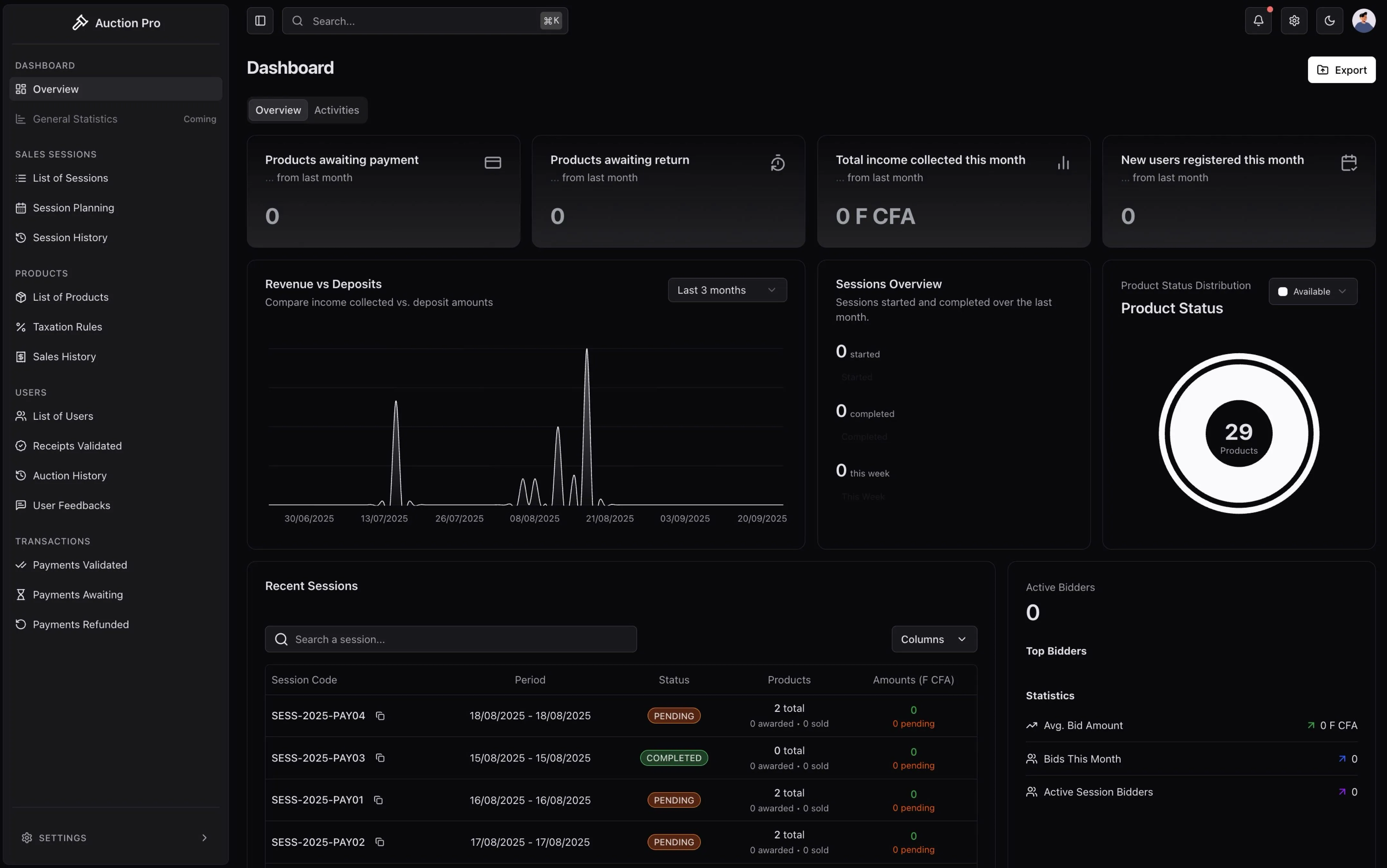
Screenshot: User dashboard showing upcoming sessions, bidding history, and account status
Dashboard Overview:
📊 Dashboard Sections:
- 🏛️ Available Sessions: Upcoming auctions you can join
- � My Activity: Bidding history and current participations
- 💳 Payment Center: Deposit status and transaction history
- 📦 My Items: Won items and their pickup/delivery status
- 🔔 Notifications: Important updates and auction alerts
- ⚙️ Settings: Account preferences and notification controls
⚡ One-Click Operations:
- 🔍 Browse Sessions: Find upcoming auction events
- 💰 Pay Deposit: Quick deposit payment for session participation
- 📋 View Bids: Check your active and historical bids
- 💳 Manage Payments: Update payment methods and view receipts
- 📞 Get Support: Direct access to customer service
- 📄 Download Receipts: Get PDF copies of all transactions
Account Health Indicators:
- ✅ Verified Account: Green checkmark for fully verified users
- 💰 Deposit Status: Current deposit balance and requirements
- 📊 Bidding Power: Available bidding capacity based on deposits
- 🏆 Success Rate: Percentage of successful auction participations
- ⭐ User Rating: Community feedback and reputation score
🏛️ Participating in Auction Sessions
Finding & Joining Sessions
[Screenshot Note: Session browser showing upcoming auctions with preview images and key details]
- Session Information
Session Name: Monthly Electronics Auction
Date & Time: March 15, 2024 - 14:00 GMT
Duration: 3 hours
Registration Deadline: March 14, 2024 - 18:00
Products: 45 items in Electronics category
Minimum Deposit: 500,000 FCFA
Session Registration
To participate in any auction session, you must:
-
Express Interest
- Click "Join Session" on the session detail page
- Review session terms and conditions
- Confirm your participation intent
-
Pay Security Deposit
- Amount: 500,000 FCFA (mandatory for all sessions)
- Purpose: Security deposit to ensure serious participation
- Refund Policy: Refunded if you don't win any items
[Screenshot Note: Deposit payment interface showing amount and payment methods]
Security Deposit Process
Understanding the Deposit System
Why Deposits Are Required
- Serious Participation: Ensures committed bidders only
- Financial Security: Covers potential payment issues
- System Integrity: Prevents frivolous bidding
- Automated Processing: Applied automatically to final purchases
Deposit Payment Methods
-
Online Payment (Recommended)
- Stripe Integration: Secure card payment processing
- Instant Processing: Immediate payment confirmation
- Receipt Generation: Automatic receipt creation
- Quick Authorization: Immediate bidding authorization
-
Bank Transfer
- Transfer Details: Provided after registration
- Processing Time: 24-48 hours for validation
- Manual Verification: Cashier validates payment
- Confirmation: Email notification when validated
Deposit Payment Workflow
-
Payment Submission
Step 1: Select payment method (Card/Transfer) Step 2: Enter payment details Step 3: Confirm 500,000 FCFA amount Step 4: Submit payment -
Payment Verification
- Online payments: Instant Stripe confirmation
- Bank transfers: Cashier validation within 24-48 hours
- Receipt generation with unique code
- Bidding authorization activation
[Screenshot Note: Payment confirmation screen showing receipt code and bidding authorization status]
- Authorization Status
- 🟢 Authorized: Ready to participate in bidding
- 🟡 Pending: Payment submitted, awaiting validation
- 🔴 Rejected: Payment issue, requires correction
- ⚫ Expired: Registration deadline passed
Live Auction Bidding
Accessing the Auction Room
When your session begins:
- Session Start Notification
- Receive notification when session goes live
- Click notification or dashboard link to enter auction room
- Verify your connection and bidding authorization
[Screenshot Note: Live auction interface showing product carousel, bid controls, and participant count]
Bidding Interface Overview
Screen Layout
- 🖼️ Product Display: Current item with images and description
- 💰 Current Bid: Real-time highest bid amount
- ⏱️ Timer: Time remaining for current item
- 🎯 Bid Controls: Your bidding interface
- 👥 Activity Feed: Recent bidding activity
- 📊 My Status: Your current bids and wins
Understanding Bid Information
Current Item: Samsung Galaxy S24 Ultra
Current Highest Bid: 850,000 FCFA
Minimum Next Bid: 860,000 FCFA (10k increment)
Time Remaining: 2:45
Your Status: Not bidding / Leading / Outbid
Placing Bids
Bidding Process
- Select Bid Amount
- Use quick bid buttons (minimum increment)
- Enter custom amount (must meet minimum increment)
- Confirm bid amount before submitting
[Screenshot Note: Bidding controls showing quick bid buttons and custom amount input]
-
Bid Submission
Current Bid: 850,000 FCFA Your Bid: 900,000 FCFA Status: Preparing to submit... Result: Bid accepted / Bid rejected / Outbid immediately -
Bid Confirmation
- ✅ Accepted: You are now the highest bidder
- ⚠️ Outbid: Another user bid higher simultaneously
- ❌ Rejected: Bid doesn't meet requirements
- 🔄 Processing: System processing your bid
Bidding Strategies
🎯 Conservative Bidding
- Bid minimum increments to test competition
- Watch timing carefully for last-minute opportunities
- Set personal maximum limits to avoid overbidding
⚡ Aggressive Bidding
- Place significantly higher bids to discourage competition
- Useful for highly desired items with strong competition
- Consider total budget across multiple items
⏰ Strategic Timing
- Monitor time remaining carefully
- Place strategic bids in final minutes
- Be prepared for automatic time extensions
Real-time Updates & Notifications
During Active Bidding
You'll receive real-time updates for:
- New Bids: When someone outbids you
- Item Changes: When bidding moves to next item
- Time Extensions: When bidding time is extended
- Technical Issues: System problems or delays
- Session Updates: Important announcements
[Screenshot Note: Notification panel showing real-time bidding updates and system messages]
Bid Status Tracking
Monitor your bidding activity:
Item #1: Samsung Phone - WON at 950,000 FCFA
Item #2: Laptop Computer - OUTBID (your bid: 750,000)
Item #3: Wireless Headphones - BIDDING (current: 125,000)
Winning & Payment Process
Auction Results
When You Win an Item
- Immediate Notification
- Real-time notification of winning bid
- Item details and final winning amount
- Payment calculation and deadline information
[Screenshot Note: Winning notification showing item details, final amount, and next steps]
-
Payment Calculation
🏆 CONGRATULATIONS! You won: Samsung Galaxy S24 Ultra

Final Winning Bid: 950,000 FCFA
Taxes (10%): 95,000 FCFA
Total Amount: 1,045,000 FCFA
Less Your Deposit: -500,000 FCFA
━━━━━━━━━━━━━━━━━━━━━━━━━━━━
BALANCE DUE: 545,000 FCFA
Payment Deadline: 48 hours
Final Payment Process
Payment Methods
- Card Payment: Secure Stripe processing (recommended)
- Bank Transfer: Direct transfer with confirmation code
- Combined Methods: Partial payment via multiple methods
Payment Submission
- Access Payment Interface
- Click payment notification or dashboard link
- Review payment calculation and verify amounts
- Select preferred payment method
[Screenshot Note: Final payment interface showing amount breakdown and payment method selection]
-
Complete Payment
Step 1: Verify payment amount (545,000 FCFA) Step 2: Select payment method Step 3: Enter payment details Step 4: Confirm and submit payment Step 5: Await payment confirmation -
Payment Confirmation
- Instant confirmation for card payments
- Cashier validation for bank transfers
- Receipt generation with unique pickup code
- Product status update to "Ready for Pickup"
Payment Tracking
Monitor your payment status through the dashboard:
- 🟡 Pending: Payment deadline approaching
- 🔵 Processing: Payment submitted, awaiting validation
- 🟢 Confirmed: Payment validated, ready for pickup
- 🔴 Overdue: Payment deadline passed
- ⚫ Cancelled: Item returned due to non-payment
Product Pickup & Completion
Pickup Process
Preparation for Pickup
- Pickup Notification
- Receive notification when payment is confirmed
- Unique pickup code generated (e.g., "PKP-2024-001234")
- Pickup location and hours information
- Required identification documents
[Screenshot Note: Pickup notification with code, location details, and required documents list]
- Required for Pickup
✅ Unique pickup code (provided in confirmation)
✅ Government-issued photo ID
✅ Payment receipt (printed or digital)
✅ Any special handling requirements
At the Pickup Location
-
Check-in Process
- Present pickup code to staff
- Verify identity with photo ID
- Confirm payment receipt details
- Sign pickup confirmation form
-
Item Inspection
- Inspect item condition before accepting
- Report any damage or discrepancies immediately
- Confirm item matches auction description
- Complete satisfaction confirmation
[Screenshot Note: Pickup confirmation form and item inspection checklist]
- Pickup Completion
- Receive item with all accessories/documentation
- Obtain pickup completion receipt
- Update system status to "Completed"
- Rate your auction experience (optional)
Pickup Timeline & Requirements
Standard Pickup Schedule
Payment Confirmation: Day 0
Pickup Available: Day 1-7 after payment
Extended Storage: Day 8-14 (additional fees may apply)
Item Return: After Day 14 (refund policies apply)
Special Handling Items
- Large Items: Special pickup arrangements available
- Fragile Items: Additional packaging and handling
- Valuable Items: Enhanced security verification required
- Multiple Items: Coordinated pickup scheduling
Managing Your Account
Personal Dashboard
Account Overview
Your dashboard provides comprehensive tracking:
[Screenshot Note: Personal dashboard showing account statistics, recent activity, and upcoming sessions]
- 📈 Statistics: Total auctions participated, items won, success rate
- 📅 History: Complete bidding history and transaction records
- 💰 Financial: Payment history, deposit status, refunds
- ⚙️ Settings: Account preferences and notification settings
Activity Tracking
Recent Activity:
━━━━━━━━━━━━━━━━━━━━━━━━━━━━━━━━━━━━━━━━━━━━━━━
✅ Electronics Auction - Won Samsung Phone (950,000 FCFA)
📦 Item picked up successfully - March 18, 2024
💸 Deposit refund processed - 350,000 FCFA remaining
🏛️ Registered for Art Auction - March 25, 2024
Notification Management
Notification Types
Configure preferences for different notification types:
- 🔔 Session Alerts: New sessions, registration deadlines
- 💰 Payment Notifications: Payment due, confirmations, refunds
- 🎯 Bidding Updates: Outbid alerts, winning notifications
- 📦 Pickup Reminders: Pickup availability, deadline warnings
- 📊 Account Updates: Profile changes, security alerts
[Screenshot Note: Notification preferences interface with toggle switches for different alert types]
Delivery Methods
- In-App: Dashboard notifications and alerts
- Email: Detailed notifications to registered email
- SMS: Critical alerts and time-sensitive updates (if enabled)
- Push: PWA notifications for mobile devices
Account Security
Password & Authentication
- Strong Passwords: Regular password updates encouraged
- Two-Factor Authentication: Additional security layer available
- Login Monitoring: Track login activity and locations
- Account Recovery: Secure account recovery options
Privacy Settings
- Profile Visibility: Control what other users can see
- Bidding Privacy: Anonymous bidding options where available
- Communication Preferences: Control how others can contact you
- Data Management: Request data exports or account deletion
Troubleshooting & Support
Common Issues & Solutions
Payment Problems
Issue: Payment not processing
Solution:
- Check card details and available balance
- Try alternative payment method
- Contact cashier for manual processing
- Verify payment deadline hasn't passed
Issue: Deposit refund delayed
Solution:
- Check refund status in dashboard
- Verify original payment method is active
- Contact support if delayed beyond 5 business days
Bidding Issues
Issue: Cannot place bids during session
Solution:
- Verify deposit payment is validated
- Check internet connection stability
- Refresh browser/app and try again
- Contact technical support immediately
Issue: Bid was rejected
Solution:
- Ensure bid meets minimum increment
- Verify you have sufficient authorization
- Check if item bidding has moved or ended
- Try refreshing and placing new bid
[Screenshot Note: Troubleshooting interface with common issues and step-by-step solutions]
Getting Help
Self-Service Options
- 📚 Help Center: Comprehensive knowledge base
- 🎥 Video Tutorials: Step-by-step visual guides
- ❓ FAQ Section: Answers to common questions
- 📋 Checklists: Pre-auction and post-auction checklists
Contact Support
- 💬 Live Chat: Real-time support during business hours
- 📧 Email Support: detailed.support@auctionpro.com
- 📞 Phone Support: Emergency support for critical issues
- 🎫 Support Tickets: Track longer-term support requests
Tips for Successful Participation
Before the Auction
- Research Items: Study product descriptions and images carefully
- Set Budgets: Determine maximum spending limits for each item
- Test System: Log in and test bidding interface before session starts
- Prepare Payments: Ensure payment methods are ready and authorized
- Plan Time: Block calendar time for full session participation
During the Auction
- Stay Focused: Monitor items you're interested in closely
- Bid Strategically: Don't reveal maximum early, bid incrementally
- Watch Timing: Be aware of time remaining and automatic extensions
- Stay Connected: Ensure stable internet connection throughout
- Stay Calm: Don't let competition pressure you into overbidding
After Winning
- Pay Promptly: Complete payment as soon as possible after winning
- Plan Pickup: Schedule pickup within required timeframes
- Inspect Items: Check condition immediately upon pickup
- Keep Records: Save all receipts and documentation
- Provide Feedback: Help improve the system with honest reviews
🎉 Congratulations on completing the User Guide!
You now have comprehensive knowledge of the Auction Pro system from a participant perspective. Remember to always read session-specific rules and conditions, as they may vary between different auction events.
Next: Explore our FAQ section or Glossary →
💬 Help Us Improve
Your feedback helps us create better documentation for everyone. Please let us know if this page was helpful or if you have suggestions for improvement.
How is this guide?